HLS Video Streaming Download
Introduction
Before I continue, I have to emphasize that I DO NOT condone piracy or any illegal activities. This blog post is purely for educational purposes and should not be used for any illegal activities. Any examples used in this blog post are used with consent and used in my local machine. If yall get caught sailing the seven seas im not responsible when yall go to jail ah.
Ways of Serving Video on the Web
Before we dive into the main content, let’s look at how video is typically delivered online:
1. Progressive download
-
A single video file (e.g. MP4) sits on a web server or CDN.
-
The browser/player starts downloading from the beginning and can play as data arrives.
-
Simple to set up, but not adaptive—viewers on slow connections may stall or buffer heavily.
2. HTTP Live Streaming (HLS)
-
Apple’s protocol based on small segment files (.ts, .aac, etc.) and a playlist (.m3u8).
-
Segments are 2-10 seconds long. The player picks the right quality based on bandwidth.
-
Perfect for adaptive bitrate streaming and CDN-backed delivery.
-
An open standard similar to HLS, is called DASH (Dynamic Adaptive Streaming over HTTP) it uses
.mpdmanifests and fragmented MP4 segments.
3. RTMP / WebRTC / RTSP
-
Real-time protocols for low-latency streaming (e.g. live events, conferencing).
-
Require specialized servers (nginx-rtmp, Janus, Wowza).
4. WebSocket / Media Source Extensions (MSE)
-
Self-hosted custom streaming via JavaScript, where you feed raw segment data into the browser’s media buffer.
-
Great for experimental protocols or very low-latency requirements.
In this section we are going to mainly focus on HLS.
File Download
When you try to fetch an HLS playlist directly, you’ll often run into a “403 Forbidden” error:
curl -o playlist.m3u8 \
  'https://example.com/link-to-m3u8-file/this-is-a-random-cookie-string/video.m3u8'
The server checks for valid headers and cookies to prevent unauthorized access. You need to replay the same headers your browser sends when it makes the request.
Finding the Right Headers
- Open DevTools in your browser and go to the Network tab
- Reload the page and find the request for the
.m3u8file - Right-click it and Copy → Copy as cURL (bash)
- Paste into a tool like Yaak to test if the request works and see which headers are being sent

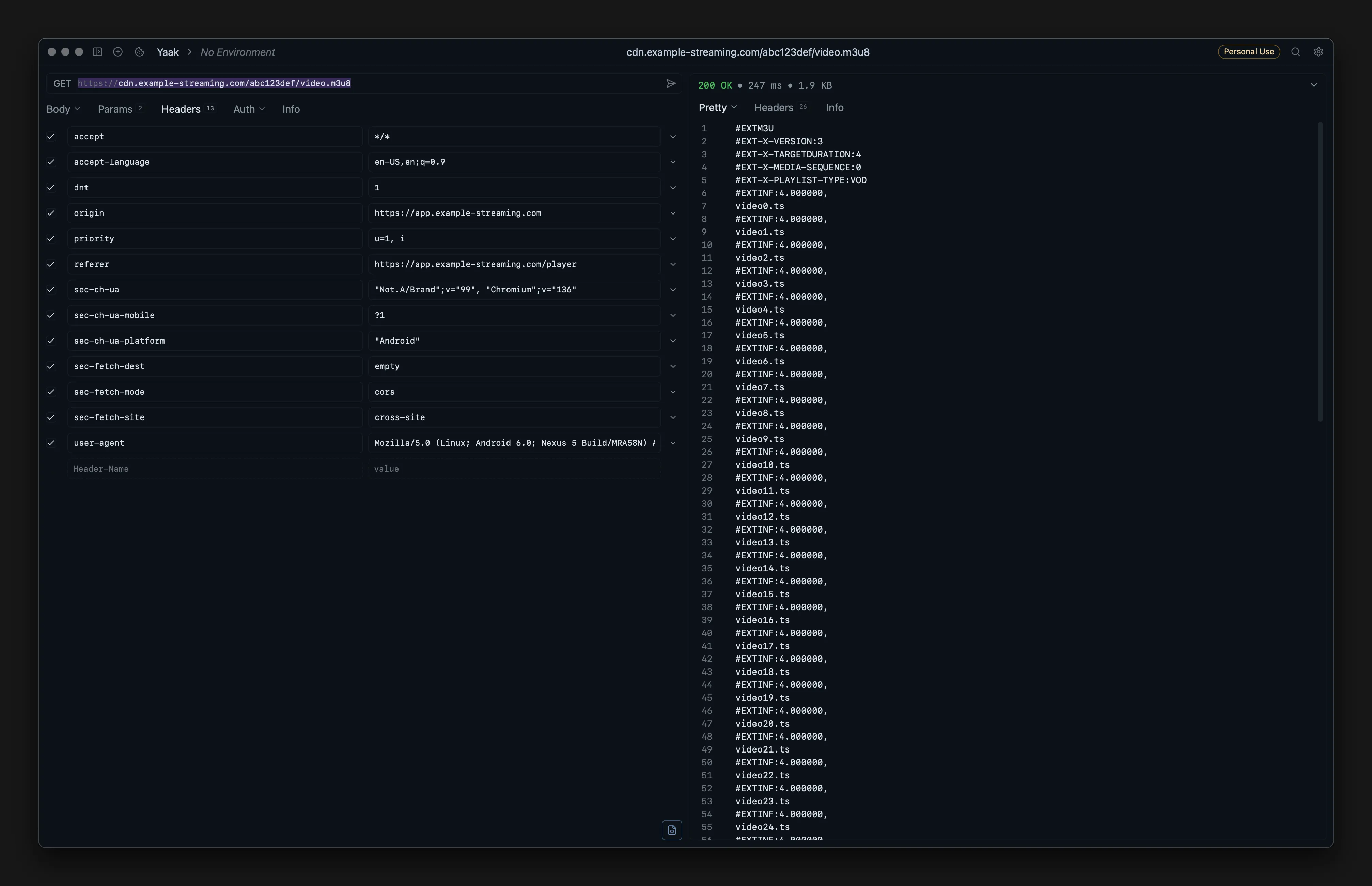
The critical headers are usually:
OriginandReferer- tells the server where the request came fromUser-Agent- identifies your browserCookie- session authentication (if required)
The sec-fetch-* and sec-ch-ua headers help but aren’t always mandatory. Test without them first, add them back if you get 403 errors.
Now you can fetch the m3u8 with curl:
curl 'https://example.com/link-to-m3u8-file/this-is-a-random-cookie-string/video.m3u8' \
  -H 'accept: */*' \
  -H 'accept-language: en-US,en;q=0.9' \
  -H 'dnt: 1' \
  -H 'origin: https://example.com' \
  -H 'referer: https://example.com/' \
  -H 'sec-ch-ua: "Not.A/Brand";v="99", "Chromium";v="136"' \
  -H 'sec-ch-ua-mobile: ?1' \
  -H 'sec-ch-ua-platform: "Android"' \
  -H 'sec-fetch-dest: empty' \
  -H 'sec-fetch-mode: cors' \
  -H 'sec-fetch-site: cross-site' \
  -H 'user-agent: Mozilla/5.0 (Linux; Android 6.0; Nexus 5 Build/MRA58N) AppleWebKit/537.36 (KHTML, like Gecko) Chrome/136.0.0.0 Mobile Safari/537.36'
If the cookie isn’t already baked into the URL, add it manually:
curl 'https://example.com/link-to-m3u8-file/video.m3u8' \
  ...same headers as above... \
  -H 'Cookie: this-is-a-random-cookie'
Understanding the M3U8 File
After successfully fetching the playlist, save it and check its contents:
#EXTM3U
#EXT-X-VERSION:3
#EXT-X-TARGETDURATION:4
#EXTINF:4.000000,
video0.ts
#EXTINF:4.000000,
video1.ts
…
#EXTINF:4.000000,
video15.ts
#EXT-X-ENDLIST
Each #EXTINF line represents one segment. Count these lines to know how many files you need to download. In this example there are 16 segments (video0.ts through video15.ts).
The segment paths can be:
- Relative paths (like
video0.ts) - segments are at the same base URL as the m3u8 - Absolute URLs (like
https://cdn.example.com/video0.ts) - use those URLs directly
Check your m3u8 file first to see which format it uses.
Download & Merge the Segments
# If using relative paths, construct the base URL from the m3u8 location
BASE_URL="https://example.com/m3u8/"

# Download segments individually
# Change the range {0..15} based on your segment count from the m3u8
for i in {0..62}; do
  curl -s "${BASE_URL}video${i}.ts" \
    -H 'Accept: */*' \
    -H 'Accept-Language: en-US,en;q=0.9' \
    -H 'DNT: 1' \
    -H 'Origin: https://example.com' \
    -H 'Referer: https://example.com/' \
    -H 'Sec-CH-UA: "Not.A/Brand";v="99", "Chromium";v="136"' \
    -H 'Sec-CH-UA-Mobile: ?1' \
    -H 'Sec-CH-UA-Platform: "Android"' \
    -H 'Sec-Fetch-Dest: empty' \
    -H 'Sec-Fetch-Mode: cors' \
    -H 'Sec-Fetch-Site: cross-site' \
    -H 'User-Agent: Mozilla/5.0 (Linux; Android 6.0; Nexus 5) AppleWebKit/537.36 (KHTML, like Gecko) Chrome/136.0.0.0 Mobile Safari/537.36' \
    -o "video${i}.ts"
done
Merging with FFmpeg
Create a text file listing all segments in order:
# Generate the file list
for i in {0..62}; do echo "file 'video${i}.ts'"; done > filelist.txt
This creates filelist.txt with contents like:
file 'video0.ts'
file 'video1.ts'
file 'video2.ts'
...
Now concatenate them into a single MP4:
ffmpeg -f concat -safe 0 -i filelist.txt -c copy output.mp4Flags explained:
-f concat- tells ffmpeg to use the concat demuxer-safe 0- allows absolute file paths (needed for the file list format)-i filelist.txt- input file containing the list of segments-c copy- copy streams without re-encoding (fast, no quality loss)
With this approach, you can reliably fetch protected HLS streams—just remember to use these techniques only on content you own or have explicit permission to download.